Implementation Cycle of D365 F&O
The implementation cycle in D365 F&O refers to the series of steps and activities involved in deploying and configuring the system to meet the specific needs of an organization.
Before designing the project plan it’s necessary to understand the project implementation methodology.
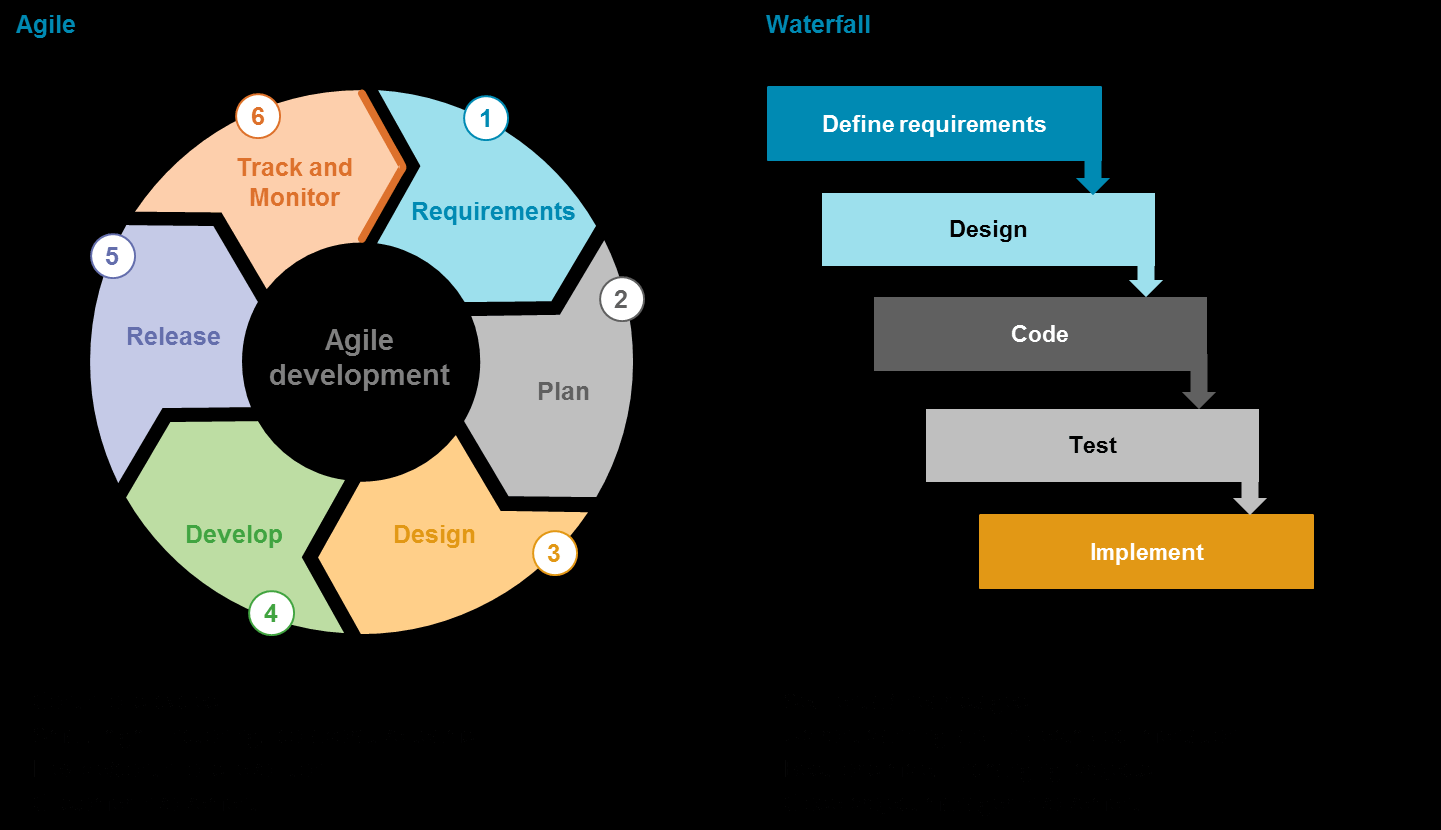
There are two types of implementation methodology:
1. Agile:
- In Agile methodology every individual or team works on the tasks at same time, or you can say that tasks can be handled in a parallel way. Multiple teams work on the different tasks at the same time and at the end tasks are combined into a project.
- Mostly adopted in large projects where the implementation cycle is 1.5 years or more.
2. Waterfall:
- In waterfall methodology the project is breakdown in different steps. Every task depends on the previous task.
- Teams coordinate daily.
- Short cycle of implementation.
You can search on google for more about these methods.
Steps in Implementation:
1. Pre-Sales Activities:
In pre-sales activities normally the customer & vendor company go through with the initial requirements and rough overview of system process according to the customer requirements.
It normally includes:
- Contract heading
- Cost estimation of project
- Budget
- Timeline
- Phases
In initial or phase 1 we will go with the standard system process and later in phase 2 for the customization. Phases can be increased based on the project cycle and requirements.
- Resources
- Other agreements
2. Kick of meeting:
A kick-off meeting is the initial meeting between the client and the consultant. Normally this is an introductory meeting between the people from the customer side and vendor side (Consultant side).
3. Requirement Gathering:
Requirement gathering in Dynamics 365 for Finance and Operations (D365 F&O) involves the process of capturing and documenting the business needs and expectations for implementing or customizing the ERP system.
- Gain a deep understanding of the organization's existing business processes. Identify key workflows, pain points, and areas for improvement.
- Identify and engage with key stakeholders, including end-users, department heads, and decision-makers. Ensure representation from various business units that will be impacted by the D365 F&O implementation.
- We will understand each module process. Let’s go with a short example if we are discussing the cash and back module.
- We need to understand what kind of transactions they are doing either using the checks or electronic transfers.
- Bank reconciliation ways either they are doing manually or advance Bank reconciliation.
- Checks will be printed from the dynamics or from the bank check book.
- You must gather as much as information you can get from the business users to smooth the implementation.
4. Preparation of various Documents:
Once the requirements are gathered completely the next process is to prepare the documents. The following are the types of documents that are used in the implementation cycle.
FRD (Funcational requirements Documents)
Funcational requirements documents are the requirements from the business side and mostly prepared by senior consultants or Business analysts. This is normally used to understand the business requirements and to keep the records what was the initial requirements we agreed and later let’s say if a client says we are not satisfied with the process you can show to them this was the document and we agreed on this.
Gap-Fit analysis
We already know how the dynamics works or what are the features of dynamics 365 F&O, after getting the requirements from the client we distinguish what are the out of the box features and what are the outside of the box.
So, we can customize those requirements that are not available in the Environment.
Example: Let’s suppose if a client wants to use the Workflow on the purchase order, we can say that this is “FIT”. But if a client wants to use the Workflow for the sales order, we can say that this functionality is not available in the system, and this is “GAP”.
FDD (Funcational design Documents)
Once we have identified the gaps in the process then we design the funcational design documents that will have the visuals and root map for the development team.
In our case it will be sales order workflow will be used before confirming the sales order there will be some additional parameters in the workflow based on the financial dimensions and so on.
So, you can say this document will have the funcational requirements for the customization and how it will look like and what information it will have.
TDD (Technical design Document)
This document is prepared by the technical team, which package will be created for this requirement, which new classes will be created and other object references.
5. Other integrations
If a client wants to use some other apps or 3rd party tools with dynamics 365 F&O, they can integrate it with the other apps such as CRM or other apps.
6. Funcational Test Cases:
These functional test cases cover a broad range of scenarios to ensure that the Environment meets its Business requirements and behaves as expected in various situations. The specific test cases will depend on the nature of the business process and the requirements provided.
7. CRP (Conference Room Pilot)
CRP is an internal testing phase that occurs before UAT, where key stakeholders validate the system in a controlled environment & business users and consultants discuss the Business process in the system.
8. UAT (User Acceptance Testing), User Training
UAT is the final phase of testing before the system is deployed into the production environment. The primary goal is to ensure that the Implementation of process meets the business requirements and is ready for use by end-users. The main goal of user training is to equip end-users with the knowledge and skills necessary to effectively use the new system.
9. Pre-Go-Live & GO-Live
Once the UAT is completed the next step is to upload the opening balances that are very important part for the implementation cycle to make sure that the legacy system balances are transferred correctly to the F&O. And after that business users can start using the Live environment and can post the transactions.
10. Go-Live support!
Once they go live users will face some issues and will not be able to post transactions so, in that case you must support the business and it will be for 1 or 2 months.
11. Support contract
Once the contract is ended for the implementation cycle the client can make a service level agreement for the support services in that case you will be providing the support to the client. If the client uses the dynamics, they will need the support from the vendor for the issues or new enhancements.
12. Servers
Following types of servers are provided by the Microsoft and used:
- Production Environment (used for the day-to-day live activities)
- UAT (Sandbox) (Used for the user acceptance testing)
- Dev server (used for the customizations and deploying the packages)
Happy Learning ……….